
Across state agencies, IT procurements are hitting unnecessary roadblocks, and many of them stem from one thing: steps in Ariba are not being completed or recorded correctly.
When required actions like Step 1 (“Validate Answer to ‘Is this an IT Project?’”) aren’t finished, or when the step in Ariba doesn’t match the actual work being done, target dates shift forward and projects appear behind schedule even when they shouldn’t be.
These small misalignments add up, causing “Past Target” status updates, miscommunication, and delays that ripple across teams and timelines.
A Smarter, Proactive Way to Manage Procurements
The IT Procurement Dashboard helps prevent these delays.
It gives agencies a clearer, faster, and more proactive way to manage every procurement. Because it reflects real-time actions in Ariba, the dashboard helps you catch issues early, before they disrupt the rest of your workflow.
If a procurement stalls in one step, everyone sees it. Responsibilities are clear, support is easy to access, and next steps are obvious.
Pinpoint Issues and Clear Up Confusion
Delays happen for a handful of predictable reasons:
- A step wasn’t completed in Ariba.
- The recorded step doesn’t match actual progress.
- Communication is needed but hasn’t occurred yet.
The dashboard brings these causes to the surface in seconds. And when you’re unsure about what comes next, your Statewide IT Procurement Contract Specialist is ready to help sort it out before the timeline slips.
Your Central Hub for Clarity and Confidence
Think of the IT Procurement Dashboard as the control center for each procurement. It turns the 10 step Ariba process into a clear visual journey, helping you see where your procurement stands and what actions are coming next.
Here’s what you can expect:
- Instant Progress Visibility - At a glance, you can see whether your procurement is at the beginning, midway, or nearing completion.
- Clear Responsibilities - The dashboard identifies the IT Contract Specialist assigned to your project – no guessing, no confusion. If something is stuck, the Statewide Procurement Guidance Team (PGT) can step in to help resolve bottlenecks.
Deadline Awareness You Don’t Have to Chase
The dashboard highlights items approaching their target dates:
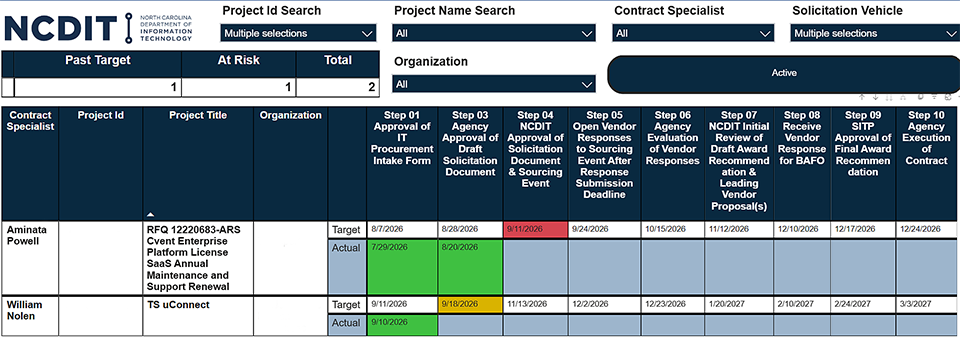
- Yellow flags (“At Risk”) appear when deadlines are five days away.
- Red flags (“Past Target”) signal missed actions and automatically adjust timelines based on average completion times.
This visual alert system helps you take timely action and keeps projects moving smoothly.
If there’s uncertainty about the correct step to take in Ariba, agency procurement specialists should reach out to their IT Contract Specialist to make sure the dashboard reflects accurate progress.
Need Extra Help? We’ve Got You.
The Statewide Procurement Guidance Team (PGT) is here to assist if you run into difficulties at any step. With their support and consistent use of the IT Procurement Dashboard, you can eliminate preventable delays and keep your IT procurements moving smoothly from start to finish.